 pirehub
Research, create and build with Pirehub AI.
Work with AI, read the web, create images and run supported tools from one workspace. Bring REST, MCP and WHOIS APIs into your own applications.

Illustrative web connections
Simulated values for this illustration; not production metrics.
curl -X POST "https://www.ntanduy.com/api/v1/domain/whois" \ -H "x-pirehub-api-key: $PIREHUB_API_KEY" \ -H "Content-Type: application/json" \ -d '{"domain":"ntanduy.com"}' # 200 OK — illustrative response{ "success": true, "data": { "domain": "ntanduy.com", "query_domain": "ntanduy.com", "registered": true, "registrar": "Cloudflare, Inc." }}
- GET
/api/v1/web/crawls/{id}Website crawl status - GET
/api/v1/tools/bank-qr/banksSupported banks - POST
/api/v1/domain/whoisDomain, DNS & registrar lookup - POST
/api/v1/web/searchWeb search with citations - MCP
/mcpModel Context Protocol server
Illustrative request and simulated values — not live production metrics.
// built with


01 / products
Choose the capability your task needs.
Start in the AI workspace, explore web information or use a developer tool directly. Each product has its own access conditions.
Pirehub AI
A workspace for conversation, web research, image creation and supported tool actions.
Open AI workspace Web informationWeb Intelligence
Search and read websites with AI, or capture public webpages through the Screenshot API.
Explore web capabilities Developer toolsDeveloper APIs & Tools
Domain and DNS lookups, screenshots, shortlinks, media tools and bank-transfer QR codes.
Browse developer tools Separate offeringPirehub Cloud
Explore the existing cloud plans and discuss the resources your application needs.
View cloud plans02 / workflow
From a question to a useful result.
Ask a question
Describe what you want to research, create or look up.
Gather information
Use enabled search and website-reading tools for context.
Use a supported tool
Generate an image, look up WHOIS or manage a shortlink.
Review the result
Check AI output and external sources before using them.
03 / domains
DOMAINS / DNS / WHOIS
Understand your domain.
Look up public registration information and inspect DNS records with the existing WHOIS and DNS tools. Manage domain registration and DNS changes with your provider.
- WHOIS lookup with registrar and expiry details
- Inspect common DNS record types
- Check registration dates when the registry provides them
POPULAR EXTENSIONS
- .com
- .net
- .org
- .io
- .dev
- .app
- .ai
- .co
WHOIS can include registration dates, registrar, status, DNSSEC and nameservers when published by the registry.
- Registrar
- Cloudflare, Inc.
- Registrant
- DATA REDACTED
- Registered
- May 20, 2025
- Updated
- Apr 8, 2026
- Expires
- May 20, 2027
- Status
client transfer prohibited- DNSSEC
signed- Nameservers
- julio.ns.cloudflare.comtess.ns.cloudflare.com
Initial record for ntanduy.com — run a lookup to retrieve current WHOIS information.
04 / infrastructure
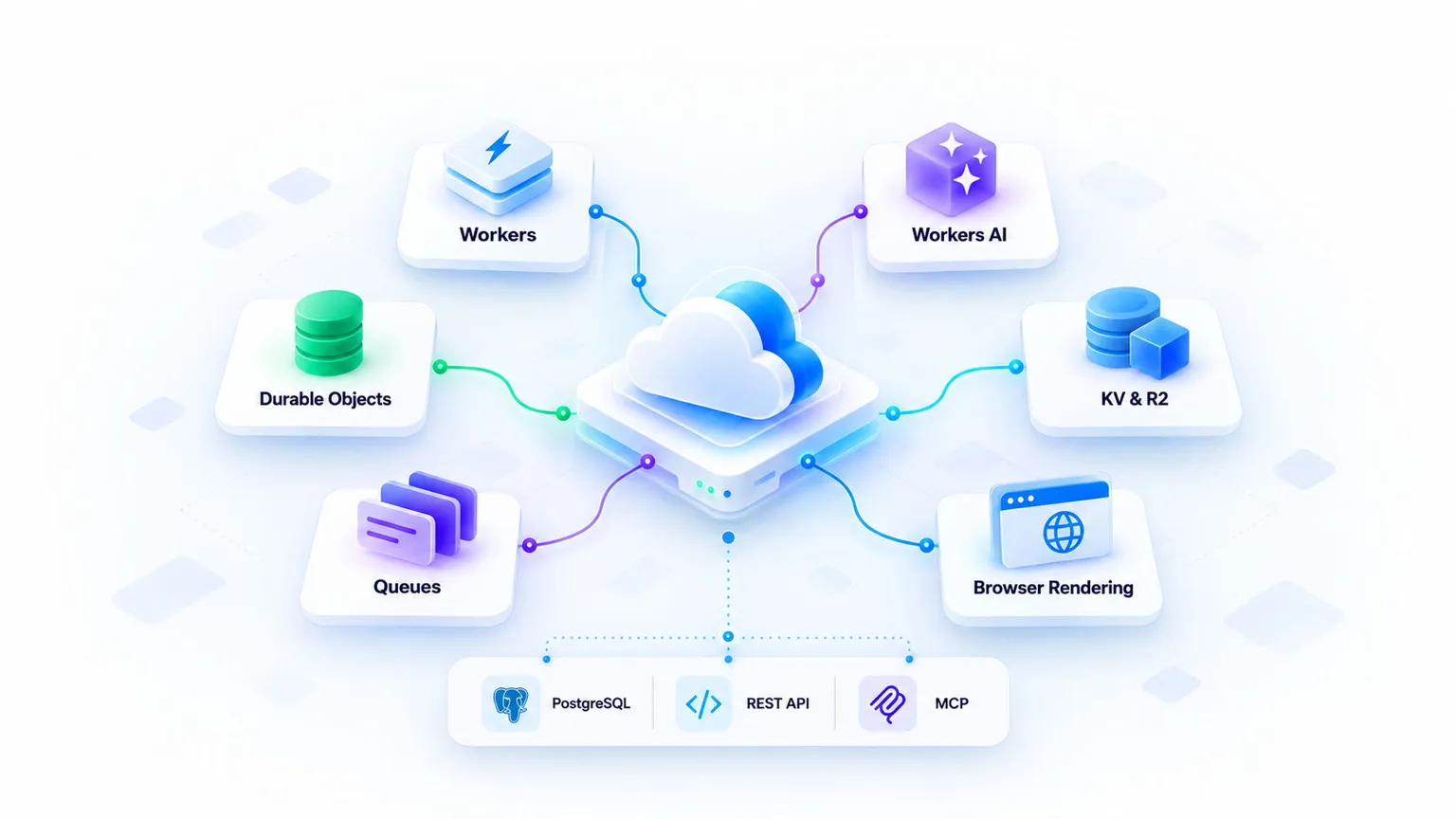
Cloud infrastructure for AI and web tools.
Serverless compute, AI inference, stateful services and storage power the AI workspace, web tools and developer integrations.
- 01
Serverless compute
Workers - 02
AI inference
Workers AI - 03
Stateful services
Durable Objects - 04
Storage
KV & R2 - 05
Background processing
Queues - 06
Web capture
Browser Rendering
GLOBAL EDGE NETWORK
- IAD
- SFO
- GRU
- LHR
- FRA
- TYO
- SIN
- SYD
Services run close to your users across the edge network — region codes shown for illustration.
- 01 / ENTRY
Connect
REST API / MCP client
- 02 / COMPUTE
Process
Workers / AI / Browser
- 03 / OUTPUT
Deliver
Structured data / Media
05 / developers
Build with REST APIs and MCP.
Protected operations require an issued key or supported OAuth scopes. Plans, quotas and permissions apply.
Connect your applicationREST
Call documented REST endpoints from your own application or workflow.
Connect supported toolsMCP
Initialize the MCP server and inspect its tool list before calling an operation.
Look up domain informationWHOIS / DNS
Use WHOIS, DNS and IP endpoints with their documented inputs and limits.
Capture pages and resolve embedsPNG / oEmbed
Use the Screenshot API for PNG capture and oEmbed for supported social posts.
Build from the contractOpenAPI
Read OpenAPI, required scopes, quotas and error responses before integrating.
import { Client } from "@modelcontextprotocol/sdk/client/index.js";import { StreamableHTTPClientTransport } from "@modelcontextprotocol/sdk/client/streamableHttp.js";const client = new Client({ name: "my-app", version: "1.0.0" });await client.connect(new StreamableHTTPClientTransport(new URL("https://www.ntanduy.com/mcp"), { requestInit: { headers: { "x-pirehub-api-key": process.env.PIREHUB_API_KEY } },})); // list supported tools firstconst { tools } = await client.listTools(); const dns = await client.callTool({ name: "lookup_domain_dns", arguments: { domain: "ntanduy.com" },});
Illustrative example. Replace with an issued key and required scope.
06 / pricing
Cloud plans for your application.
Cloud plans are separate from AI credits and developer API plans. Contact support to confirm resources and region before ordering.
Reference conversion · billed in USD
Starter
Perfect for developers starting small and looking for great value at a low cost.
$10.00/month- 1 vCPU (shared)
- 2GB RAM
- 10GB SSD (ephemeral)
- 200GB bandwidth
- 1 (US only)
- Basic CDN
Pro
PopularAll the power you need to take your project to the next level.
$20.00/month- 2 vCPU (dedicated)
- 4GB RAM
- 40GB NVMe SSD
- 1TB bandwidth
- 5 global edge regions
- Automatic CI/CD
- SLA 99.5%
Business
Production-ready resources for teams that need more performance, security, and control.
$49.00/month- 4 vCPU (dedicated)
- 8GB RAM
- 100GB NVMe SSD
- 3TB bandwidth
- 10 global regions with failover
- SSO, RBAC, audit logs
- SLA 99.9%
07 / payment utilities
{ "bank": "MB", "accountNumber": "0123456789", "amount": 100000, "memo": "ORDER 1028", "imageSize": 512}
Example transfer details. Verify the recipient before making a payment.
bankSupported bank identifieraccountNumberRecipient account numberamountOptional transfer amount in VNDmemoTransfer reference or descriptionGenerating a QR code does not transfer money or confirm a payment.


Prepare bank transfers with a QR code.
Generate a Vietnamese bank-transfer QR code with the existing tool or integrate the documented API. The result contains transfer details and a QR image; it does not execute or verify a payment.
Create a transfer QR code
Use the existing bank QR tool to prepare bank-transfer details.
Open QR toolIntegrate the documented API
Review required scopes, input validation, credits and limits before calling the API.
Read the guideReview payment terms
For Pirehub purchases, supported payment methods and the final total are shown at checkout.
View terms{ "qr": { "type": "dynamic", "image": { "format": "svg", "mimeType": "image/svg+xml" } }}
Simplified response for illustration. See the documentation for the complete response.
08 / technology
Technology behind Pirehub.
Pirehub builds its workspace, tool orchestration and developer interfaces around third-party infrastructure and services. These links are references, not a deployment marketplace or partnership claim.
- Documented interfaces
- Existing technology
- Scoped access
STACK / LAYERS
- WorkspaceConversation and tool UI
- OrchestrationSupported tool actions
- InterfacesREST APIs and MCP
- Data & cachePostgreSQL and Redis
- InfrastructureThird-party cloud services
A reference view of how the pieces fit together — not a live system diagram.
09 / developer tools
Everyday tools, one API away.
Use the existing tools directly, or integrate capabilities that have a documented API. Access requirements vary by tool.
Screenshot APIScreenshot APICapture any public webpage as a PNG with viewport and device options.Shortlink dashboardShort linksCreate and manage branded short links with click statistics.WHOIS APIWHOIS lookupLook up domain registration, registrar and expiry information.DNS APIDNS lookupResolve A, AAAA, MX, TXT and other records for any hostname.Browser toolImage convertConvert supported image formats with the existing browser tool.Bank QR APIBank-transfer QRGenerate VietQR-style transfer codes with amount and memo prefilled.10 / workflows & bots
Connect tools to your own workflow.
Workflows
Call documented APIs from your own application or automation platform. Pirehub does not provide a general-purpose workflow builder.
Explore workflows BotsChat bots
Explore the available bot experiences and check supported commands before use.
Set up a bot EventsWebhook triggers
Handle events in your own application. Verify each integration’s supported events and authentication requirements.
Read webhook docs11 / security & devops
Build with care.
Operate with confidence.
Good infrastructure is only the beginning. Bring security, repeatable delivery and recovery planning into the way you build with Pirehub.
Engineering practices to consider for your integration — not a certification, security guarantee or managed operations package.
- 01
Review
Code changes & access boundaries
- 02
Validate
Automated checks & staging
- 03
Release
Controlled deployment & rollback plan
- 04
Observe
Errors, service health & follow-up
Keep access intentional.
Separate environments, scope API credentials and keep secrets out of browser code.
Verify every boundary.
Validate inputs and verify webhook signatures before changing application state.
Ship smaller changes.
Review changes, run checks and validate releases in staging before production.
Make failures visible.
Track errors and useful request signals without logging secrets or unnecessary personal data.
Plan for the unexpected.
Define backup, restore and rollback procedures for the services your product depends on.
Design for retries.
Use bounded retries, explicit timeouts and idempotent actions in connected workflows.
12 / faq
What to know before you start.
Product access, AI tools and where to find documentation.